Imagine RIT is (as I’m writing) this upcoming Saturday! For those unaware, Imagine is essentially a giant maker faire that RIT hosts every year, with this year’s being on Saturday, April 25. I, being a first year, haven’t actually experienced it yet, but I’ve gotten the impression that it’s pretty cool and will be in attendance. However, this event’s approach came with a very unexpected consequence: it completely broke TigerDine.
For those unaware, TigerDine is a small iOS app that I’ve been working on throughout this academic year for getting information about the dining locations on campus. RIT’s official offerings aren’t very good, and I wanted a better source of this information. I’m in the midst of an actual full writeup on the creation of TigerDine, but it’s spiraled a little out of control and so I’m not entirely sure when I’ll be getting it out yet. Fortunately all you really need to know is that this app exists, it provides information about dining locations, and if you’re an RIT student you can go download it here. Now that we’re all on the same page, let’s discuss what happened here.
Crash Reported
A tester submitted feedback for iOS 1.2.3 (36).
I was home for a wedding over the weekend of April 18-19, and while on my way back, I glanced over to my phone to look at directions (because I’m hopeless at navigating on my own and would never make it back to Rochester otherwise), and was just in time to see a notification informing me that someone submitted feedback on a crash report for TigerDine. Uh oh. I was still about an hour out, so I just ignored it and hoped that it was a fluke given that there had been a few other crashes in the past month or so. I was, unfortunately, very mistaken and had an additional two crash reports waiting on my phone by the time I stepped back into my dorm room.
I unpacked my stuff, pulled out my MacBook, and pulled up the crash report in Xcode so that I could see where things went wrong. The exception occurred during the getDiningData() method when it called out to parseLocationInfo(). This is where new data is fetched from TigerCenter and run through parsing code to convert it from the mess that TigerCenter serves into the structure that TigerDine runs on.
To get really specific, the exception was that the app unexpectedly found nil while unwrapping a value when it was trying to parse visiting chefs, right on the second Int()! inside of the else branch here:
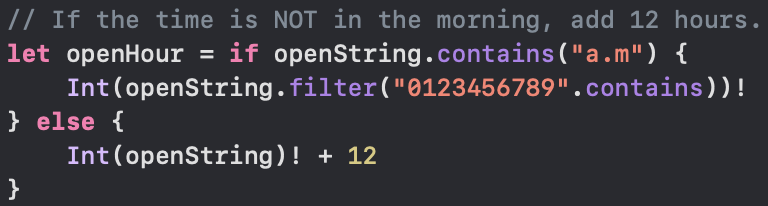 Suspiciously force unwrap shaped code.
Okay, that’s weird. I’ve never seen that unwrap throw an error before. Clearly TigerCenter wasn’t down again because it wouldn’t get anywhere near that far and I’ve seen it safely catch that error and display the no connection screen. So what the hell went wrong?
The next thing I did was visit the API myself to see what it was feeding my app. I figured out the date that it was crashing on and went and looked at that response specifically. At first glance, everything looked okay, but then I noticed something odd. There was a visiting chef, Halal n’ Out, at Crossroads from 11AM - 4PM. This confused me at first, because Crossroads is specifically not open on Saturdays. There are two dining locations in Global Village, Cantina and Crossroads, and they trade off on Saturday/Sunday. Then I was reminded that Saturday, April 25 was Imagine RIT. That at least explains the hours, but why is the app crashing?
Formatting Hell
This is something I’ve already started explaining in my yet unfinished “Making of TigerDine” article, but the way that visiting chef info is formatted in the response data from TigerCenter is terrifying. There are several formats, and none of them are consistent beyond the fact that the name of the visiting chef and their hours are part of the same string that I need to break apart. The hours are formatted differently depending on when the chef will be there, with opening times in the morning specifying AM and opening times in the afternoon specifying nothing. Let’s look at some samples:
"D'Mangu (11 a.m.-2 p.m.)""Esan's Kitchen (11 a.m.-2 p.m.)""P.H. Express (4-7 p.m.)"
Not the most amazing way to format that information, is it? But oh well, I wrote code to parse it, and it had served me well. That was, of course, before Crossroads decided to have a visiting chef for Imagine that breaks my code:
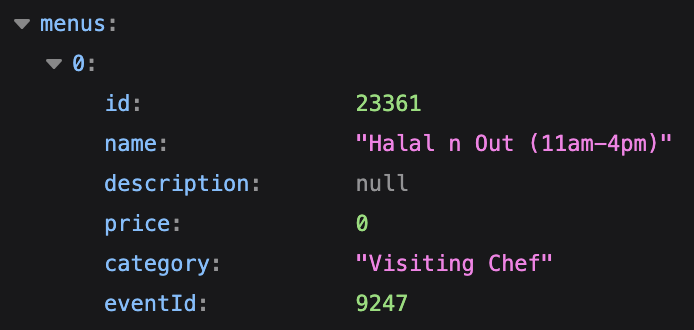 I guess they updated my time format to match the updated RIT logo.
Notice what’s missing? The string "Halal n Out (11am-4pm)" is lacking the dots in AM and PM that you can see in my other examples. If you also go and look back at my code, you can probably already see what happened. My code identified a morning opening time vs an afternoon one with the statement if openString.contains("a.m"), assuming that every variation of 11 AM (the only morning time ever actually used) would contain at least a period after the A. Suddenly, though, it hit an occurrence that didn’t.
It’s not hard to see what happened from there. The openString being parsed is everything after the first ( up until the - with any whitespace trimmed. That means in this particular instance, openString was "11am". If you continue to trace the code, you’ll see that "11am" does not in fact contain "a.m", which means that we fall into the else branch. From there, you can see that we try to cast "11am" into an integer, and then force unwrap it(!!). "11am" does not, in fact, cast to an integer, and so we force unwrap nil, cause an exception in parseLocationInfo(), and that goes all the way up the chain until the app crashes, as there’s no handling anywhere in that chain. Oops.
The biggest problem with this whole chain of events is that it makes the app crash as soon as it tries to load data. The thing it does when it launches. The impending arrival of Halal n’ Out for Imagine RIT effectively killed TigerDine. You’d open it, and it would immediately crash.
<24 Hour Turnaround Time
Once I figured out what was happening, I needed to fix it as fast as possible. The app was completely unusable, and I got another crash report while I was sitting there trying to figure it out. I went for the simplest fix that I could think of, which consisted of two small changes that you can see here:
 No force unwrap is a huge bonus.
My fix was to simply check openString for both "a" and "m" separately, since this string will only ever resemble something like the "11am" it was here or "11 a.m." for other locations, so if there’s an A and and M we must be in the clear. I decided to double up though, and so I also replaced the force unwrap in the else branch with an unwrap-or, with the default value essentially being noon (default of 0, + 12 because it’s treating it as an afternoon time). This is less than optimal if it actually happens, but still vastly preferable to the app immediately crashing.
From there, my next objective was to speedrun the release. I archived the build and shipped it off to App Store Connect, and wrote my release notes ASAP while waiting for it to finish processing. As soon as it was done, I submitted the app for beta review to get it to TestFlight users, and added it to the v1.2.4 App Store release and submitted that for regular review. Then came the waiting game. I worked as fast as I could, but the time until people were able to use the app again was in Apple’s hands. It hurt when I got an additional two crash reports in the evening because it was fixed and I had submitted the fix, but I couldn’t get it out any faster and with no means of communication with any given user I can’t exactly tell them “don’t worry, the fix is on the way!”.
Fortunately they didn’t torture me for too long, and at 1:38 PM on Monday, April 20, the app passed review and was released onto the App Store, making it just 3 minutes off from being released exactly 22 hours after I opened the crash report in Xcode. I think I’m pretty happy with a sub 24 hour time from opening the crash report to having the fix public!
What Was Learned
Holy shit I need to handle errors better (or like, at all).
Genuinely though, while I feel like the parsing issue itself was fairly reasonable to have happen, it taking the entire app down was not. Should I have used a force unwrap where I did? Probably not, but also like I said I had never actually encountered an issue here before. The real issue is the lack of error handling throughout most of TigerDine. A network error triggers an error screen on launch, but if we manage to get some JSON then there need to be checks in place to make sure everything doesn’t absolutely explode while we’re working with it.
RNGadget doesn’t have much error handling either, and I think I neglected to consider that RNGadget is a closed loop and the ideas I had there don’t translate super well to TigerDine. RNGadget is an entirely local app where essentially all variables are in my control. The only places that allow for user input are either fixed like a picker or a button, or are text fields that only allow numbers inside anyway. As long as I account for any edge cases where someone could potentially hit buttons in a weird order that would break my state or somehow type something that isn’t a number where they shouldn’t, I could be reasonably sure that a force unwrap was entirely safe. I had control over the conditions, so I could make assumptions about the data getting to a certain line of code. TigerDine on the other hand doesn’t have those same guarantees. I’m assuming that the data from TigerCenter will never change, but it could, and as this experience demonstrated, I hadn’t really stopped to consider that possibility. I can make assumptions, but there are external factors that might lead to things not being in the state that I was anticipating.
The fix I threw in to not force unwrap is absolutely not the best option, and it’s not going to stay long term. This was meant to be a quick fix created in a panic upon finding out that my Thing That Many People Use could no longer be used, with the idea that I would make things suck less when the app was stable and I could work at my own pace. Lots of try/catch blocks are in my future. TigerDine is an app that accesses external data, and so it needs to behave as such.
Anyway, I hope that this was an interesting read! I’ve been wanting to post another blog article, and with the “Making of TigerDine” article taking as long as it is, this incident seemed like a great opportunity to throw another technical article together. It also serves as a piece that I can present to people if they ask “hey why was TigerDine crashing the other day?” which is great because then I don’t have to retell the entire story!
That’s all for now, and stay tuned for the extended TigerDine lore.